


Software has always been hard work. You learn a language, wrestle with frameworks, and debug for days to turn an idea into something people can use. That barrier explains why 82% of businesses report a shortage of developer talent and why we rely on expensive specialists to ship anything beyond a prototype. But what if you could skip most of the syntax and let an AI handle the boilerplate?
In February 2025, AI pioneer Andrej Karpathy joked that “the hottest new programming language is English,” because large language models can take a natural‑language description and generate working code.
He coined the term “vibe coding”—a style of building where you fully give in to the vibes and forget about the code. Instead of writing functions, you describe your goals, accept the AI’s suggestions, and iterate until it works. Karpathy built weekend projects by simply talking to his code assistant and copying error messages back into the prompt.
In this article…
What is Vibe Coding?
Vibe coding is an AI‑assisted development technique where you describe software in natural language and let a large language model generate and refine the code. The developer focuses on outcomes and iteratively prompts the AI instead of manually editing source files.
In traditional coding, you write every line yourself and control every decision. Vibe coding flips that dynamic. You don’t review diffs; instead you run the program, see if it meets your expectations, then ask the AI to adjust. Karpathy describes this as “see stuff, say stuff, run stuff, and copy‑paste stuff”.
Suggested Read: Google Antigravity Review: Full Hands-On Test of the AI Coding IDE
How Does Vibe Coding Work?
This workflow has three key components:
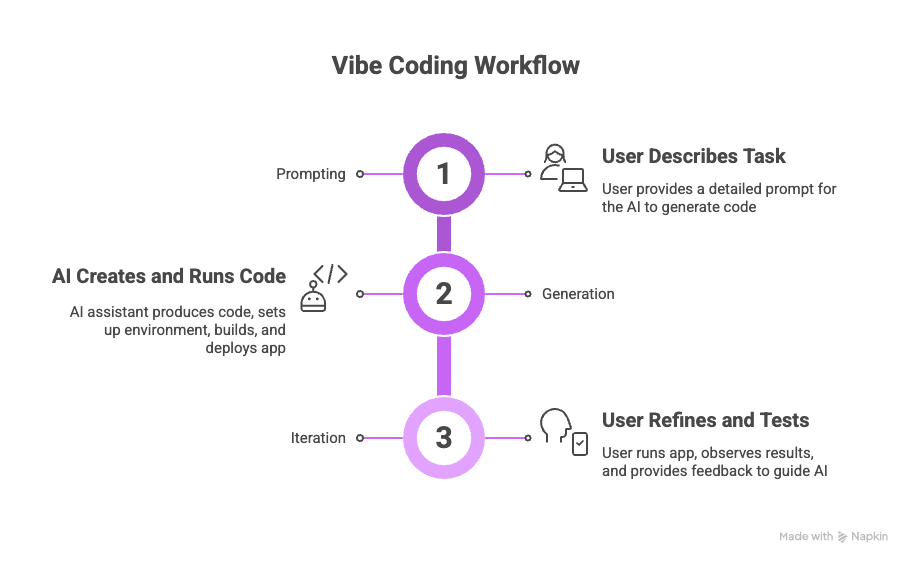
- Prompting: you describe what you want—“build a to‑do list app with login and dark mode” or “write a script that emails me weather updates.” You might include examples, requirements or error messages.
- Generation: the AI assistant produces code, orchestrates tools (e.g., compilers, package managers), and may even run the code. On platforms like Replit, the agent handles environment setup, builds the app, and deploys it automatically.
- Iteration: you run the app, observe the result, and refine your prompt. Instead of editing files directly, you guide the AI: “The list items are not saving—fix that,” or “Add validation for empty inputs.”
In my own experiments with Replit Agent, I asked it to create a simple budgeting web app. I described the desired features, such as adding expenses, calculating totals, and visualizing the results.
The agent scaffolded a React app with a Node backend, set up a SQLite database, and deployed it. When it failed to format currency correctly, I didn’t dig into the code; I just told the assistant, “Format amounts in Indian rupees,” and it regenerated the relevant components.
Within an hour, I had a functional prototype without writing a single line of JavaScript. That’s the essence of vibe coding: high‑level direction over low‑level implementation.
Why Did Vibe Coding Take Off in 2025?
Vibe coding has exploded because modern AI assistants are good enough to handle entire workflows. Tools like Replit Agent can turn plain‑English instructions into a working app. Microsoft Power Apps and GitHub Copilot let business users build apps by chatting.
Startup incubators report that 25% of their 2025 batch had codebases that were 95% AI‑generated. At big tech companies, executives boast that over 30 % of new code is written by AI. Put simply, a new generation of “citizen developers” can build things faster than ever before.
Vibe Coding vs. AI Pair Programming
AI pair programming tools, such as GitHub Copilot or Cursor, suggest snippets while you write code, but you remain in control of the edits. Vibe coding hands over the keyboard entirely, with the developer acting as the director rather than a co-author.
In pair programming, the AI serves as a helpful colleague, offering autocomplete suggestions. You still design the architecture, write tests, and review every change. Vibe coding goes further: you accept AI output wholesale and focus on describing the goal, not the syntax.
Think of vibe coding as using a junior developer who never tires and follows your instructions to the letter, while pair programming is like having an autocomplete on steroids that you still manage carefully.
Also Read: 200+ AI Statistics You Need to Know Before 2026
Why are Beginners and Non-Coders Drawn to Vibe Coding?
Vibe coding lowers the barrier to software creation, allowing people without formal programming training to build apps by describing their intent.
It’s especially appealing for beginners because it removes the need to learn syntax, frameworks, or deployment workflows.
The shortage of developers means many good ideas never become products. Vibe coding opens that door. The Microsoft case study of Doher Drizzle Pablo illustrates this shift: she used Power Apps to chat about her expense problem and, within two hours, was using her own custom expense management app.
She had no coding background but leveraged an AI assistant to automate a tedious task. Similar stories abound across startups and enterprises where non‑technical team members build prototypes themselves.
What Makes Vibe Coding Easy to Start With
AI agents handle environment setup, boilerplate, and deployment, so beginners can focus on problem‑solving. Natural‑language prompts mean you don’t need to memorize APIs or syntax.
Here are reasons vibe coding resonates with beginners:
- No installation headaches – Platforms like Replit run in the browser and configure everything for you. You don’t worry about Node versions, dependencies, or build tools.
- Plain‑language communication – You describe your idea in everyday language. For example, “Create a sign‑in page with Google OAuth.” The AI chooses libraries and writes the code.
- Immediate feedback – You see results in minutes, encouraging experimentation. Replit research shows that citizen development can speed app creation by up to 5.8 times.
- Learning by doing – Each iteration teaches you how apps are structured. Some users start without coding skills and gradually gain understanding by observing AI changes.
How experienced developers use Vibe coding
Experienced developers use vibe coding to prototype, explore unfamiliar technologies, and automate repetitive tasks. It acts as a multiplier, freeing them to focus on architecture and creative problem‑solving rather than boilerplate.
As Microsoft engineer David Fowler notes, vibe coding reduces the “blank page problem”, helping developers get a first draft quickly. Amanda Silver cautions that you still need specification‑driven development for production software, but acknowledges its value for rapid experimentation.
In my experience, vibe coding speeds up research spikes: when I wanted to test a new API, I asked the AI to scaffold a demo, then switched back to manual coding once the concept proved viable.
Vibe Coding Benefits for Developers and Teams
Vibe coding accelerates prototyping, lowers costs, encourages iteration, and empowers cross‑functional collaboration. It helps lean teams test ideas quickly and makes software creation more inclusive.
1. Faster Prototypes and Shorter Feedback Loops
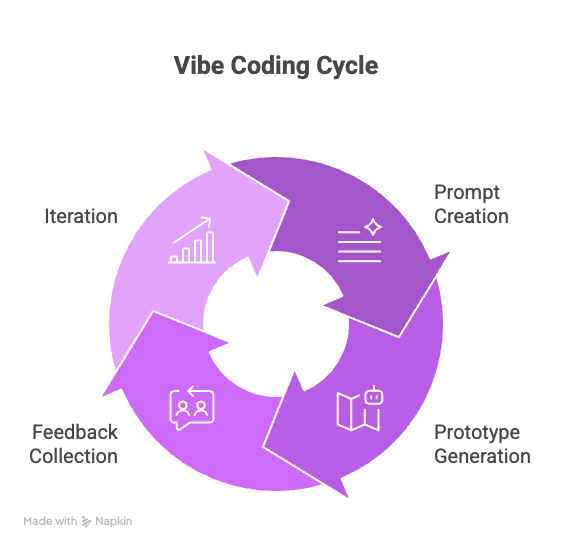
By automating setup and boilerplate, AI agents can produce a working prototype in minutes. You instantly see the result, adjust your prompt, and iterate.
Fast feedback is the hallmark of vibe coding. Klarna’s CEO reported that he can describe a product concept and receive a working prototype in 20 minutes.
For early‑stage startups, this compresses the idea–validation cycle dramatically. Rather than waiting weeks for an engineering team to deliver a demo, product managers can test market hypotheses the same day.
2. Lower Development Costs for MVPs
Cutting down boilerplate reduces development hours, letting teams allocate resources to business logic rather than scaffolding. Small teams can build MVPs without hiring large engineering staffs.
When AI handles configuration, routing, and deployment, developers spend more time refining the product. Businesses avoid the cost of hiring specialists for early prototypes and can validate ideas before committing to a full build.
3. More Experimentation and Rapid Iteration
Because prompts are cheap to adjust, teams can explore multiple approaches quickly. This fosters creative problem‑solving and surfaces unexpected solutions.
In a traditional process, rewriting an architecture or trying a new library is expensive. Vibe coding flips that: you can ask the AI to swap React for Svelte or add a chatbot interface and see the impact immediately.
The ability to explore encourages non‑technical stakeholders to contribute ideas, improving product-market fit.
4. Better Collaboration Across Product, Design, and Engineering
By using natural‑language prompts, product managers, designers, and entrepreneurs can express requirements directly. This reduces friction between roles and speeds collaboration.
For example, a designer can tell the AI, “Create a dashboard with a light theme and card‑style components,” and instantly see a prototype.
This shared language breaks down silos, allowing teams to iterate on UI/UX without waiting on developers.
Risks and Limitations of Vibe Coding
Vibe coding introduces inconsistent code quality, technical debt, debugging challenges, security vulnerabilities, and accountability gaps. It is not a silver bullet for production software.
A. Inconsistent Code Quality and Maintainability
AI‑generated code may lack uniform style and architecture. Without human oversight, projects can become fragmented and hard to maintain.
Large language models generate code based on patterns in their training data. They might produce verbose functions, copy outdated patterns, or mix architectural styles.
Over time, this leads to a patchwork of inconsistent modules that make refactoring difficult. Professional engineers must review and refactor AI output to maintain cohesion.
B. Technical Debt and Scaling Problems
Early speed often hides future maintenance costs. Without a solid architecture, teams may need to rewrite large portions of code later.
Because vibe coding prioritizes “getting it working” over design, many prototypes lack clear separation of concerns. This technical debt becomes apparent when scaling: you may find duplicated logic, tight coupling, and missing tests.
C. Debugging and Testing Challenges
Developers often don’t understand how AI‑generated logic works. Locating bugs or edge cases becomes harder, and there may be hidden side effects.
When the AI writes every line, you lose context for why the code behaves a certain way. Debugging turns into guesswork: you feed error messages back into the assistant, hoping it resolves the issue.
Without proper tests, regressions slip through. Remember that AI models may generate different solutions on each run, making deterministic debugging even more challenging.
D. Security Risks in AI-Generated Code
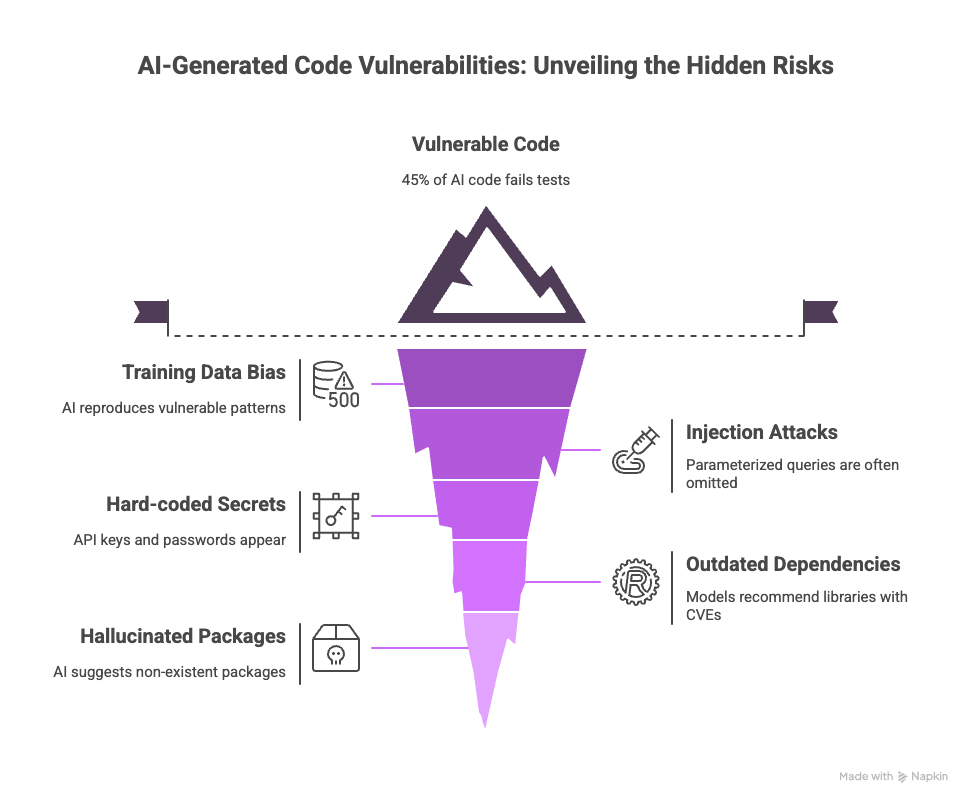
The Veracode 2025 GenAI report shows that 45% of AI‑generated code samples fail security tests. In some languages, like Java, failure rates exceed 70%. AI may reproduce vulnerable patterns from its training data, introducing SQL injection, cross‑site scripting, and other flaws.
Security is arguably the biggest downside of vibe coding. The Veracode report analyzed 100+ models across 80 tasks and found that nearly half of the generated code contained serious vulnerabilities. Even as models improve, their security performance has remained flat.
Common issues include:
- Injection attacks – Parameterized queries are often omitted; AI reproduces insecure SQL patterns.
- Hard‑coded secrets – API keys and passwords sometimes appear in generated code.
- Outdated dependencies – Models may recommend libraries with known CVEs.
- Hallucinated packages – The AI might suggest a package that doesn’t exist, opening a path for supply‑chain attacks.
E. Where Vibe Coding Breaks Down
Generative AI struggles with complex, multi‑file systems, poorly documented libraries, and tasks requiring deep domain expertise. It’s ideal for throwaway prototypes, not for building robust, maintainable applications.
Experts like Gary Marcus note that vibe‑coded apps often reproduce existing patterns without originality.
For regulated sectors, the risk of compliance violations and intellectual property ambiguity is high. The consensus among engineers is that vibe coding is a powerful sandbox for creativity but not a replacement for disciplined engineering.
How to Get Started With Vibe Coding
Choose a platform like Replit Agent or GitHub Copilot, define a simple project, craft clear prompts, iterate cautiously, and review the generated code.
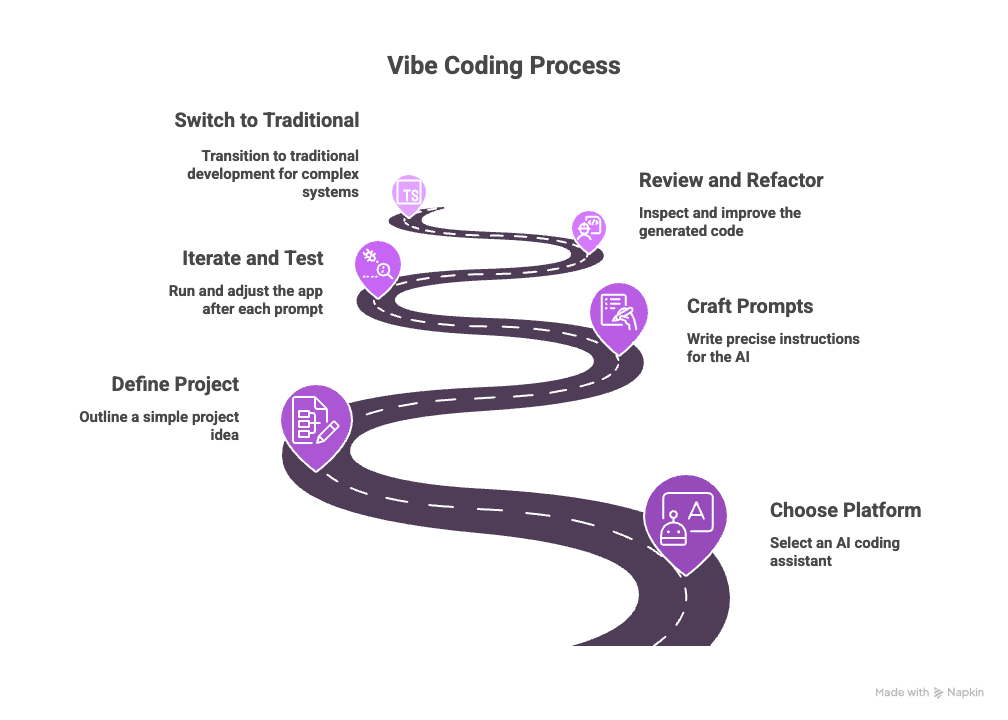
Starting with vibe coding is straightforward, but some preparation helps ensure success. Here’s a step‑by‑step guide:
1. Pick the Right Tool for Your Workflow
Select an AI coding assistant that matches your needs. Replit Agent excels at end‑to‑end app generation, Power Apps is great for business workflows, and GitHub Copilot integrates into your editor for pair programming.
Consider what you want to build. For web apps, Replit provides a full-stack environment; for automating internal workflows, Power Apps or Zapier’s AI builder might suffice. Each tool offers different levels of control and abstraction.
2. Start With a Small, Well-Scoped Project
Start with a well‑scoped idea such as a to‑do list, expense tracker, or data dashboard. Vibe coding works best for simple applications.
Begin with something you can describe clearly in a few sentences. Outline the core features and the user experience you want. Avoid complex state management or external integrations until you are comfortable with the AI’s capabilities.
3. Write Better Prompts (With Examples)
Be precise and specific when instructing the AI. Break the project into smaller tasks and specify functionality, design, and constraints.
Good prompts reduce iteration time. Instead of saying “Build a chat app,” try: “Create a chat application where users can sign up with Google, send messages in real time using WebSockets, and store conversations in a PostgreSQL database.” Provide context gradually to respect the AI’s context window.
4. Iterate, Test, and Save Checkpoints
Run the app after each prompt, note what works and what doesn’t, and adjust your instructions accordingly. Use version control or checkpoints to capture working states.
I like to check in my project after each successful step. If the AI introduces a bug later, I can roll back easily. Testing often helps catch issues before they compound and makes debugging more manageable.
5. Review, Refactor, and Add Basic Tests
Even if vibe coding hides the code from you, take time to inspect and refactor the generated output. Look for security issues, duplicate logic, and unnecessary dependencies.
Treat the AI’s output as a first draft. Use your editor’s search tools to understand how functions are structured. Add tests to document expected behavior. This step turns a prototype into a maintainable codebase.
6. Know When to Switch Back to Traditional Development
Use vibe coding for prototypes, learning, and creative exploration, but switch to traditional development for production systems. When the complexity grows or when security, performance, and compliance matter, rely on disciplined engineering.
Vibe Coding Tools in 2026
Several AI platforms enable vibe coding, each with different strengths. Replit Agent, Microsoft Power Apps, GitHub Copilot, Cursor Composer, and low‑code platforms like Mendix or OutSystems support natural‑language app creation.
1. Replit Agent
Replit’s Agent handles everything from environment setup to deployment. It builds entire apps from scratch, integrates databases and object storage and offers one‑click deployment.
Replit positions itself as the “#1 vibe coding platform”. Its browser‑native environment means you don’t need local tools.
You can chat with the agent, describe your app, and watch it assemble the code. The platform also offers Autoscale Deployments and real‑time collaboration.
2. Microsoft Power Apps and Copilot
Power Apps lets business users build custom workflows by conversing with an AI designer. GitHub Copilot is integrated into Visual Studio Code to suggest code and automate monotony.
Power Apps’ Plan Designer feature allows non‑coders to create an app within hours. GitHub Copilot excels at augmenting professional developers: David Fowler uses it to automate daily tasks and free up time for more meaningful work.
3. Cursor Composer and other agents
Cursor Composer is an AI coding assistant that works with Anthropic’s models to build features quickly. Many startups now offer similar agents that can scaffold projects based on voice or text prompts.
Cursor’s Composer tool, used by Karpathy in his examples, orchestrates code generation and integrates with the Cursor IDE.
While promising, these tools face the same limitations around code quality and security. Evaluate each platform’s safety practices before using them in critical projects.
Other vibe coding tools you can check out include Bolt.new and Landingsite.ai, among others.
Responsible Vibe Coding: Security and Best Practices
Adopt governance practices: audit-generated code, document prompts, enforce reviews, limit use in critical systems, and choose secure platforms.
Security and responsibility are paramount. Here are concrete steps to mitigate risks:
Code Review and Security Audits
Review every piece of AI‑generated code before merging it. Use static analysis tools and peer reviews to catch vulnerabilities.
Even if the app works, inspect for injection flaws, insecure configurations, and secrets. Treat AI output with the same scrutiny you would give to a junior developer’s work. Create checklists for common security issues.
Prompt Logging and Traceability
Record prompts, iterations, and versions to understand how the code evolved. This helps debug issues and attribute responsibility.
Keeping a log of prompts and changes creates an audit trail. It allows you to reproduce the generation process, find the root cause of bugs, and satisfy compliance requirements.
Tests, CI/CD, and Guardrails
Add automated tests and integrate continuous integration pipelines to ensure the AI doesn’t introduce regressions. Never skip peer reviews or automated tests.
Testing is your safety net. Unit tests, integration tests, and static analysis can catch issues the AI misses. Use CI tools to run tests on every change so that insecure code doesn’t reach production.
When to Limit Vibe Coding in Production
Reserve vibe coding for prototypes, internal tools, or front‑end experiments. For regulated or mission‑critical systems, rely on traditional coding practices and spec‑driven development.
If you work in healthcare, finance, or other regulated industries, AI‑generated code must meet strict standards. Use vibe coding to explore ideas, but require human engineers to rebuild the solution with security and compliance in mind.
Choosing Secure Platforms and Handling Secrets
Evaluate vendor security practices and ensure the tool has protections against data leaks. Prefer platforms that offer secret management, permission controls, and continuous security updates.
Check whether the platform stores your code, how it handles authentication, and whether it exposes your API keys. Replit, for example, provides built‑in secret storage, whereas some emerging tools have suffered breaches.
Training and Governance for Teams
Organizations should educate developers and non‑technical users on AI coding best practices and establish governance frameworks.
Infosecurity Magazine recommends mandatory training on secure AI use, clear policies on IP ownership, and executive accountability for AI risks. These measures ensure that innovation doesn’t outpace security.
The Future of Vibe Coding in 2026
Vibe coding is likely to remain a powerful tool for prototypes and education, but mature software development will continue to rely on human expertise.
We’ll see improved safety, better agent collaboration, and a clearer distinction between “vibe coding” and “AI‑assisted engineering”.
Will Vibe Coding Replace Software Engineers?
No. It shifts the role of developers toward architecture, validation, and debugging. AI augments humans but doesn’t eliminate the need for deep expertise.
AI can accelerate routine tasks, but designing robust systems requires human judgment. Even as models improve, their security capabilities lag behind their functional ones.
Developers will spend less time writing boilerplate and more time ensuring code quality, scalability, and compliance.
How AI Coding Agents May Evolve
Expect agents to become more reliable collaborators, with built‑in security checks and better context management. Low‑code and no‑code platforms will continue to integrate natural‑language interfaces.
Future AI assistants may automatically generate unit tests, follow secure coding guidelines and explain their reasoning. They’ll also respect domain‑specific constraints (e.g., healthcare compliance) and integrate with design tools. Meanwhile, the line between vibe coding and AI‑assisted engineering will blur as teams adopt hybrid workflows.
Practical Advice for Developers Today
Stay curious. Experiment with vibe coding to learn its capabilities and limits, but invest in foundational skills like algorithms, design patterns, and secure coding. Use AI as a creative partner, not a replacement for your craft.
As a developer, I find vibe coding inspiring for hack‑day prototypes and personal projects. It sparks new ideas and reduces tedium. But my professional work still relies on clear specifications, test‑driven development, and code reviews. The future belongs to those who balance creativity with rigor.

